AI that understands your business
Notes, tasks, and knowledge management powered by AI, with your company's context and European privacy standards.
Available now. No commitment required.
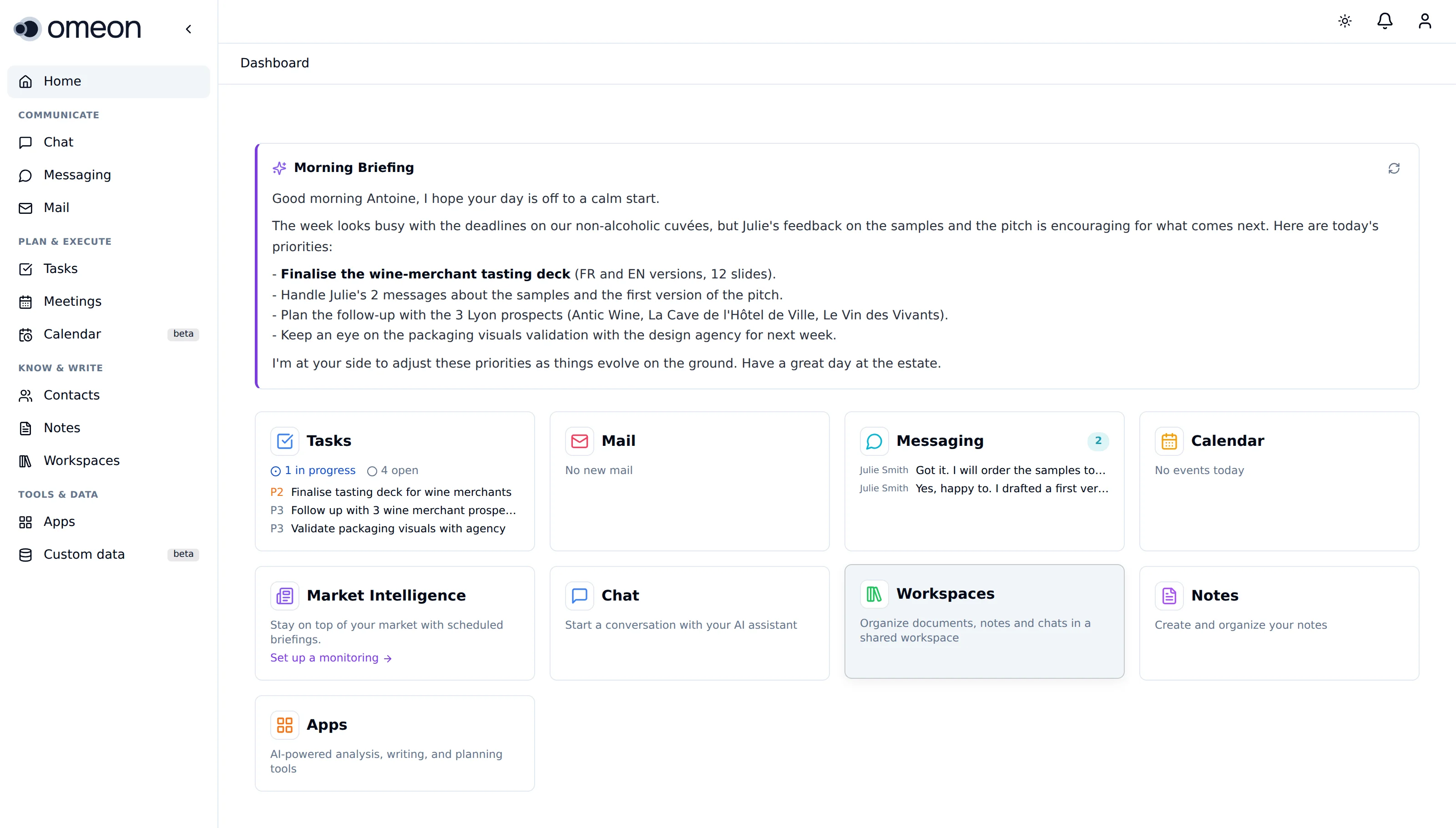
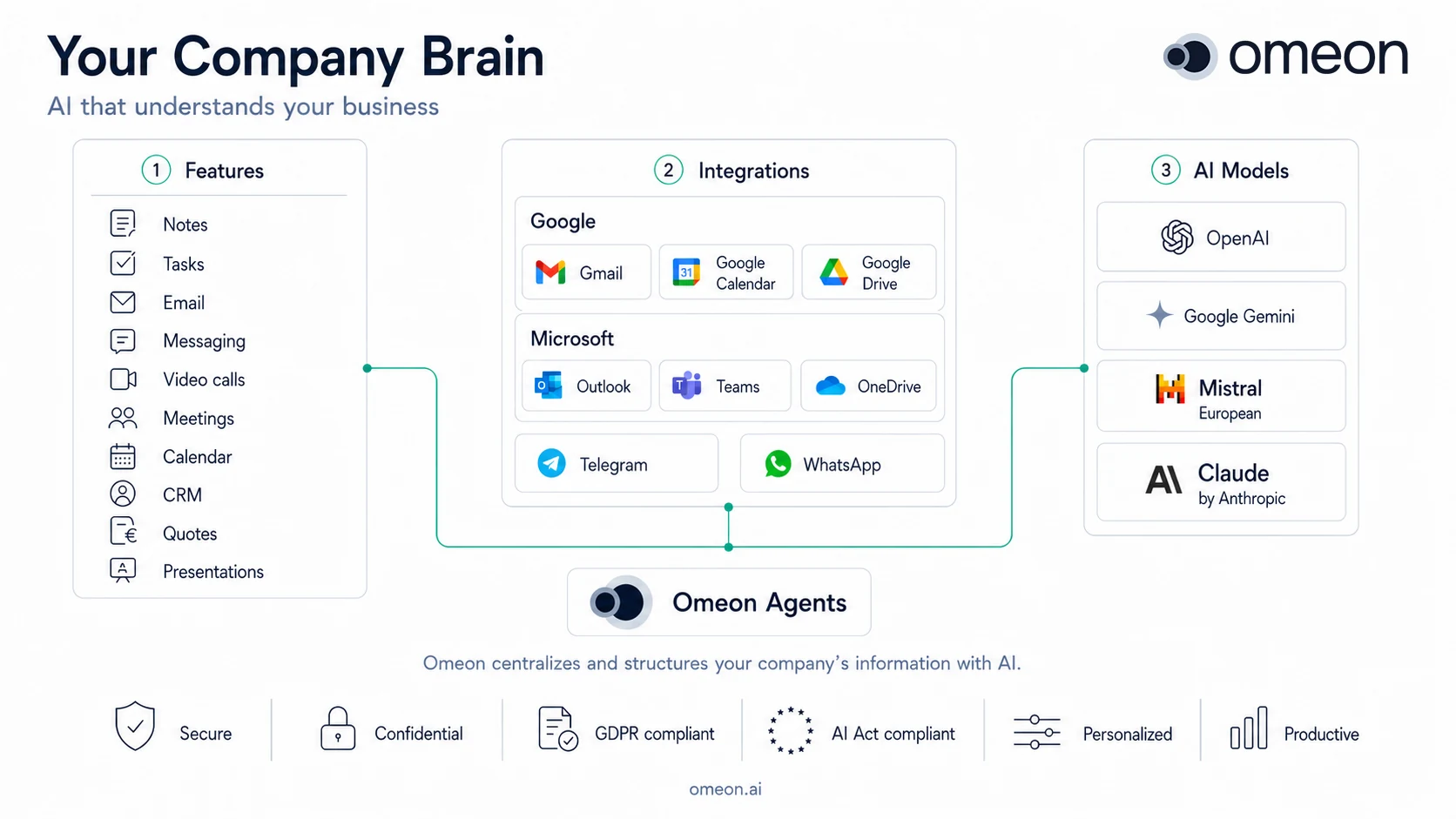
Everything your team needs
A unified workspace combining intelligent notes with AI-powered assistance and tools.
AI Assistant
Chat with or dictate to an AI that knows your company's context. It updates your notes, your CRM and your tasks, and takes action right where your team works.
Smart Notes & Knowledge Base
Organize your knowledge with tags and nested collections. Share notes with specific team members or your whole organization. AI helps you maintain, rewrite, translate, and enrich your content.
- And more…
Audited deep analysis
An AI agent drafts your report. A second agent then checks every claim against web sources, corrects errors, and gives you a reliability score. Real quality control before delivery.
- Team Collaboration
- Share knowledge, manage permissions, and stay aligned across your organization.
- Instant Recall
- Find anything across all your notes with powerful full-text search.
- AI Apps
- Access a suite of AI-powered apps: marketing plans, business plans, market analysis, image generation, and more. Orchestrated AI agents that handle complex tasks and export to Word and PDF.
- Custom AI Apps
- Design your own AI applications and share them with your organization. Omeon automatically builds multi-agent workflows, from web research to user interviews to document generation.
- Flexible Databases
- Manage your contacts, projects, and data in flexible tables. Create your own databases with zero technical skills. Omeon guides you through it.
- Import & Export
- Bring your data in and take it out. Import your existing content and export notes, reports, and AI-generated business plans to Word, Excel, and PDF, ready to send to your bank, partners, or clients.
Chat, call, and meet without leaving Omeon
No more juggling between Slack, Zoom, and WhatsApp. Your team messaging is built in, with AI on top.
- Text, voice, video
- Send a message, hop on a call, or start a video meeting, all in one place.
- Everything is connected
- Mention a note, a contact, or a project right in the conversation. Nothing gets lost.
- Meetings transcribed and summarized
- Every meeting is automatically transcribed in full. Find key decisions and action items, without taking a single note.
Focused workspaces, isolated contexts
Create as many workspaces as you need. Each one is a separate, focused context. Gather files, web links, notes, and AI apps in one place, without mixing topics.
- Files & web links
- Upload documents and add web links that refresh automatically. Each workspace keeps its own set of resources, separate from the rest.
- Contextual conversations
- Start AI conversations scoped to a specific workspace. Every answer draws only from that workspace's files, links, and notes.
- Contextual AI apps
- Run AI apps within a workspace. Analysis and reports are automatically grounded in that workspace's context, not your entire account.
- Website Chatbot
- Add an AI assistant to your website in less than 15 minutes. It answers your visitors 24/7, drawing from your expertise and the documents you select.
Omeon Drive
Your files, synced and usable by Omeon AI.
More than storage: the document memory your assistant can read.
- In the app
- Create folders, upload and share files across your organization. Trash, restore, version history and quota tracking included.
- Desktop sync
- The Mac and Windows apps sync an "Omeon Drive" folder on your machine: two-way sync, offline editing, conflict handling and content-hash integrity checks.
- Access anywhere
- Mount the Drive as a network drive over WebDAV and reach your files from any device.
- AI-ready
- Attach a folder to a workspace: Omeon AI reads your documents for search and sourced answers, with a privacy guardrail on sharing.
Storage is per organization, included in every plan and expandable. See plans →
Email & calendar, powered by AI
Connect your mailbox and calendar. AI reads, summarizes, and turns your emails into action.
AI email summaries
Every incoming email is automatically summarized by AI. Get the key information at a glance, without reading the full thread.
Task identification & distribution
AI detects action items in your emails and suggests tasks. Assign them to the right person in one click, directly inside Omeon.
Calendar integration
View your schedule alongside your notes and tasks. Everything in one place, always in sync.
Works with your everyday tools
Connect your Microsoft or Google account to bring mail, calendar, contacts and files into Omeon. Import your Notion workspace, mount your Nextcloud folders, and your Telegram and WhatsApp conversations come along too.
- Microsoft 365
- Mail · Calendar · Contacts · OneDrive
- Google Workspace
- Gmail · Calendar · Contacts · Drive
- Notion
- Pages · Databases · Continuous sync
- Nextcloud
- Files · Folder sync · Your own server
- Telegram
- Your conversations, in your Omeon inbox
- Your conversations, in your Omeon inbox
Privacy by design
Your data stays yours. Built for European standards.
- 01 / 03
Hosted in France
Your data is hosted by OVH in Roubaix, France. Fully within EU jurisdiction, close to your business.
- 02 / 03
GDPR Compliant
Full GDPR compliance built into every layer. Your data is processed and stored in accordance with European data protection regulations.
- 03 / 03
European AI Models
Choose European AI models like Mistral to keep your data within EU boundaries. You can exclude non-European models entirely.
Simple, transparent pricing
Choose the plan that fits your team.
Essentials
For teams who want a daily AI assistant
A flexible AI budget, shared across your entire team
- Unlimited notes and tasks
- AI assistant (chat, notes, workspace)
- AI applications (deep analyses, business plans, communication assistant)
- AI image generation
- Team sharing and messaging
- Collaborative workspaces
- Mail and calendar integration
Pro
For power users who want full control
A flexible AI budget, shared across your entire team
Everything in Essentials, plus:
- Choose your AI model (incl. Mistral, European)
- Create custom AI apps (AI App Studio)
- Advanced settings
- Priority support
Storage is per organization. Need more? Add 100 GB blocks, up to 5 TB, billed monthly.
How much do your actions cost?
Your AI credits are flexible. Spend them as you like.
- 1 AI message 1 credit
- 1 workspace AI message 2 credits
- 1 AI note assist 1 credit
- 1 standard image 60 credits
- 1 high-quality image 120 credits
- 1 AI application (analysis, business plan...) 750 credits
With 10,000 credits, you could for example:
- 500 AI messages + 10 deep analyses + 15 images
- 2,000 AI messages + 5 analyses
- or distribute your credits however you like.
Omeon on all your devices
Install the desktop app to sync your Omeon Drive, the Android app to keep Omeon in your pocket, or the Chrome extension to use Omeon without leaving your browser.
macOS
Mac (Apple Silicon, M1 and later)
macOS 11 (Big Sur) or later.
Omeon account required.
Windows
Windows 10/11 (x64)
Windows 10 or 11, x64 processor.
Omeon account required.
Chrome extension
For Google Chrome
Capture articles and YouTube transcripts in Omeon. Chat with Omeon directly from any page. Write posts and replies for LinkedIn, X and Facebook using your company's context.
Omeon account required.
Android
Phone and tablet
Your notes, tasks and conversations in your pocket. Capture an idea or ask Omeon a question wherever you are.
Omeon account required.
iOS
iPhone and iPad
The iOS app is on its way. In the meantime, Omeon runs in Safari on iPhone and iPad, and can be added to your home screen.
Frequently asked questions
Everything you need to know about Omeon.
Another question? Our AI assistant answers live, right here.
Interested?
Leave your email and our team will get back to you to discuss your needs.
We respect your privacy. No spam, ever.